
Naming Conventions
- Endpoint names should be descriptive: "Cricket Player Profile Scraper"
- Slugs must be lowercase with hyphens: cricket-player-profile
- Entity slugs follow the same pattern: mumbai-indians, ipl, cricket
Scraper Endpoints
Scraper Endpoints are self-service API routes that allow internal teams and trusted partners to submit sports data programmatically. Each endpoint has specific entity permissions, field-level access controls, and a priority tier that determines data precedence.
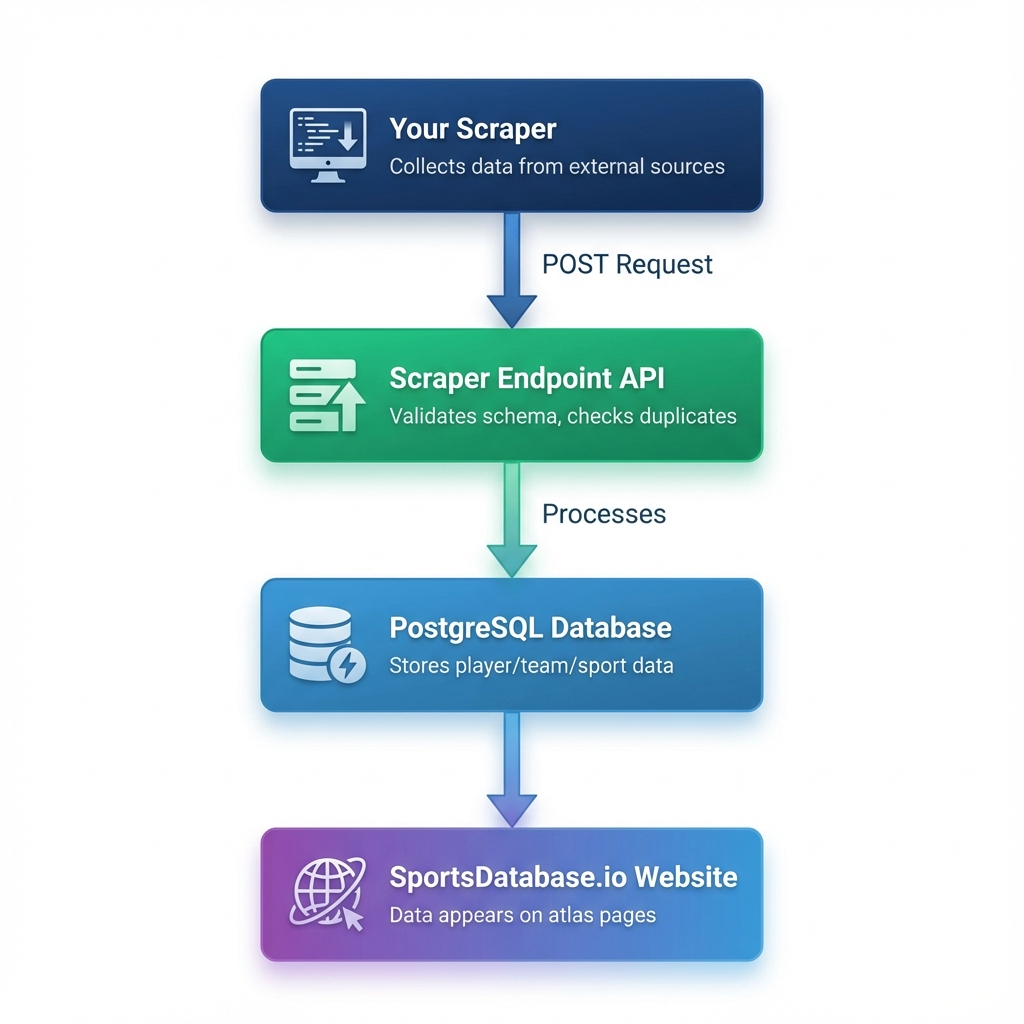
Visual diagram showing how data flows from your scraper through the API to the database:
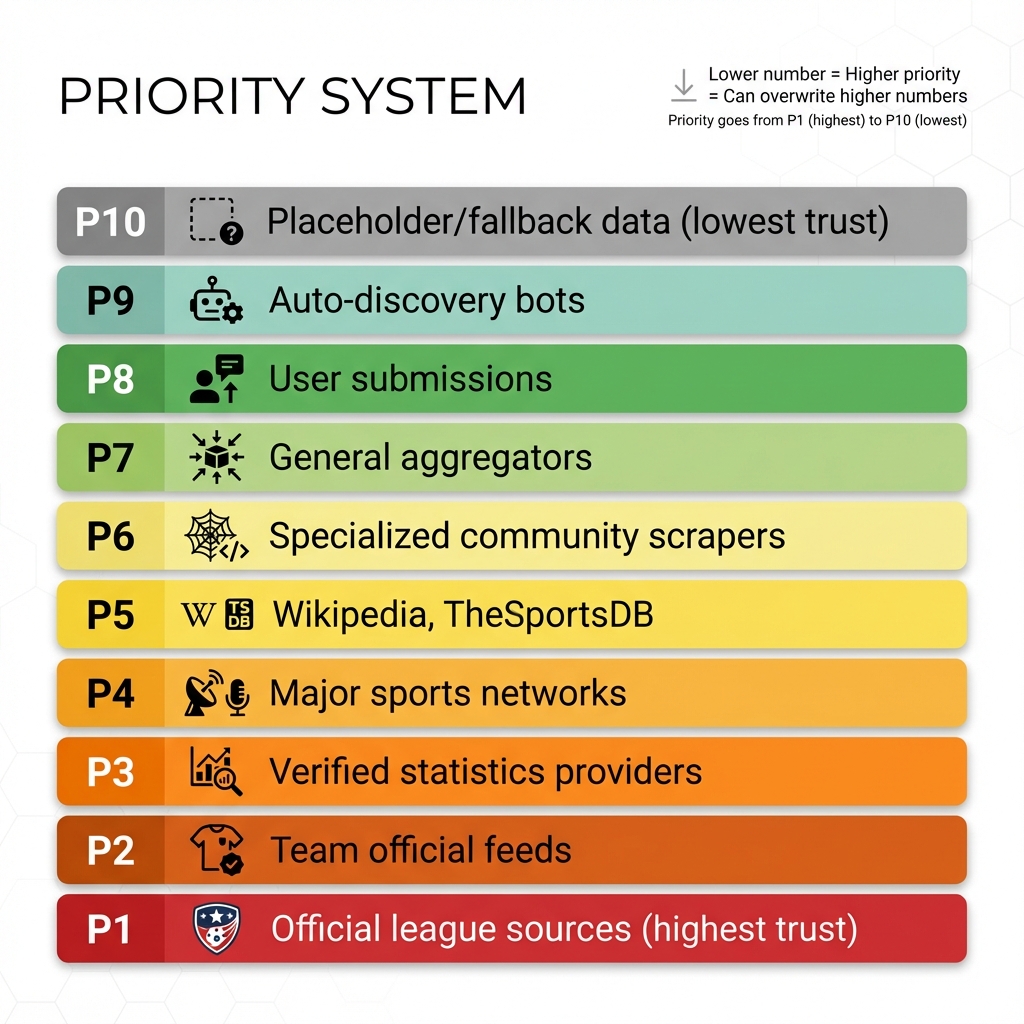
Lower number = Higher priority = Can overwrite higher numbers. A P3 scraper can update data written by P5, but not P1.
| Name | Cricket Player Profile Scraper |
| Slug | cricket-player-profile |
| Entity Types | PLAYER (check the box) |
| Priority | P5 (community scrapers) |
| Rate Limit | 1 request/second |
Key format: sep_8167ef68c618f77b6889261dfc36ac74...
Add to your .env file:
CRICKET_PLAYER_KEY=sep_your_key_here
Data flows through a structured pipeline ensuring quality and consistency:
Submit
POST to /v1/scrape/:slug with your endpoint key
Validate
Schema validation + field permission check
Queue
Submission enters moderation queue
Apply
Approved data merges into PostgreSQL
Copy this exact curl command to submit a Cricket player. Replace the key with your own endpoint key.
Working Curl Command
curl -X POST 'https://api.sportsdatabase.io/v1/scrape/cricket-player-profile' \
  -H 'Content-Type: application/json' \
  -H 'Authorization: Bearer sep_YOUR_KEY_HERE' \
  -d '{
    "entityType": "PLAYER",
    "kind": "CREATE",
    "payload": {
      "catalogId": "1000001",
      "teamSlug": "mumbai-indians",
      "firstName": "Rohit",
      "lastName": "Sharma",
      "position": "Right-Handed Batsman",
      "nationality": "India",
      "bio": "Rohit Gurunath Sharma is an Indian international cricketer and captain of India."
    }
  }'
Success Response
{
  "id": "cmjrunzst0001eirqknneqvn9",
  "status": "PENDING",
  "createdAt": "2025-12-30T00:29:29.213Z",
  "priority": 5,
  "endpoint": {
    "slug": "cricket-player-profile",
    "name": "Cricket Player Profile Scraper"
  }
}
✅ This exact call was tested on 2025-12-30 and successfully created a submission in the moderation queue.
1
Get endpoint key from Portal
2
POST JSON with correct schema
3
Check moderation queue for result
Each endpoint can be configured to handle one or more entity types. Here are the core schemas:
SPORT
Required
catalogIdnameslugsummaryOptional
governingBodyoriginYearprimaryEquipmentpopularRegionssourcesLEAGUE
Required
catalogIdsportSlugnameslugsummaryOptional
countrygoverningBodyfoundedYearwebsitechampionshiplevel+2 moreTEAM
Required
catalogIdleagueSlugnameslugsummaryOptional
citycountryfoundedYearcolorsstadiumwebsite+2 morePLAYER
Required
catalogIdteamSlugfirstNamelastNameOptional
positionnumberbionationalitybirthDateheightCm+3 moreEVENT
Required
catalogIdsportSlugleagueSlugseasonLabelhomeTeamSlugawayTeamSlugstartTimesummaryOptional
venueattendancehomeScoreawayScorebroadcastPartnerssourcesPriority determines which source can overwrite another. Lower numbers = higher authority.
P1
Official
Internal team scrapers
P2
Partner
Verified external partners
P3
Senior
High-trust contributors
P4-P5
Standard
Regular contributors
P6-P10
Basic
Lower priority sources
Important: A P3 endpoint cannot overwrite data originally set by a P1 endpoint. Priority conflicts are logged and the submission is rejected if it attempts to downgrade data quality.
The system automatically detects existing entities to prevent duplicates. Matching strategies include:
Exact Match by Slug
Entities with matching slugs are treated as the same record. This is the primary matching method.
Example: slug: 'manchester-united' matches existing Team with same slug
Catalog ID Match
The catalogId field provides a secondary unique identifier for deduplication.
Example: catalogId: '134' matches existing Player with same ID
Parent Reference Validation
Parent entities (sport, league, team) must exist before child entities can be submitted.
Example: A Player submission requires teamSlug to reference an existing Team
Priority Check
If an existing entity was set by a higher-priority endpoint, lower priority submissions are rejected.
Example: P3 submission to entity with P1 data returns 403 error
Each endpoint is configured with specific field permissions per entity type. This allows granular control:
strTeamBadge and strTeamLogo fields for Teams.heightCm, weightKg, and position fields only.Submitting fields outside your endpoint's permissions will result in a 403 Field access denied error.
Endpoint URL
POST /v1/scrape/:endpointSlug
Replace :endpointSlug with your endpoint's URL slug (e.g., cricket-player-profile).
Required Header
X-SportsDB-Endpoint-Key: sep_xxx
Keys are prefixed with sep_ and are shown only once when issued.
Sample curl command
curl -X POST https://api.sportsdatabase.io/v1/scrape/cricket-player-profile \
  -H "Content-Type: application/json" \
  -H "X-SportsDB-Endpoint-Key: sep_your_key_here" \
  -d '{
    "entityType": "PLAYER",
    "payload": {
      "catalogId": "900001",
      "teamSlug": "mumbai-indians",
      "firstName": "Rohit",
      "lastName": "Sharma",
      "position": "Batsman",
      "nationality": "India",
      "bio": "Indian international cricketer and captain of the India cricket team."
    }
  }'
Success Response (202 Accepted)
{
  "id": "cm5abc123def456",
  "status": "PENDING",
  "createdAt": "2024-12-29T19:00:00.000Z",
  "priority": 3,
  "endpoint": {
    "slug": "cricket-player-profile",
    "name": "Cricket Player Profile Scraper"
  }
}